CS2 autoexec not working? Fix the file before you rewrite your config.
The most common failure is surprisingly boring: wrong folder, hidden .txt extension, or a config that never actually executed. This page turns scattered forum answers into one fast diagnostic.
Put the file in the CS2 local cfg folder, confirm Windows did not save it as autoexec.cfg.txt, then run it manually from the developer console. If manual execution works, the file itself is valid and you can solve launch loading separately.
3/ checks
Why this deserves its own page: a Reddit thread from 2023 is still getting “this fixed it” replies in 2026, especially for the hidden .txt extension problem. That is exactly the kind of persistent search gap a focused troubleshooting page can capture.
The 60-second autoexec fix
This is the “answer-first” block I would put above the long article so a CS2 player can solve the problem without reading 1,500 words.
1
Check the real file extensionEnable “File name extensions” in Windows Explorer. The file must be autoexec.cfg, not autoexec.cfg.txt.
Most missed
2
Use the CS2 cfg folderPlace it under ...\steamapps\common\Counter-Strike Global Offensive\game\csgo\cfg\.
Critical
3
Prove it executesAdd an echo line, open CS2 console and run exec autoexec. If the message appears, your file is being read.
Best test
echo "CLUTCHSET AUTOEXEC LOADED"
exec autoexec
Why CS2 autoexec fails
Common fail
It is secretly a .txt file
Windows can hide known file extensions. A file that looks like autoexec.cfg can actually be autoexec.cfg.txt, which CS2 will not execute as a cfg.
Common fail
Wrong cfg folder
CS2 uses the local game\csgo\cfg folder for configs you want to execute. Old CS:GO paths and Steam userdata folders create confusion.
Patch issue
A command breaks after an update
Recent community reports show that a newly invalid command can make a previously working autoexec appear broken. Test with a minimal file first, then restore commands gradually.
Open the local cfg folderCounter-Strike Global Offensive\game\csgo\cfg\
→
Save your fileautoexec.cfgUse “All Files” when saving if Notepad keeps adding .txt.
Important distinction: 2026 Steam community guides describe both a local game cfg folder and Steam userdata cfg files. For a custom config you want to execute, the clean target is the local game\csgo\cfg folder.
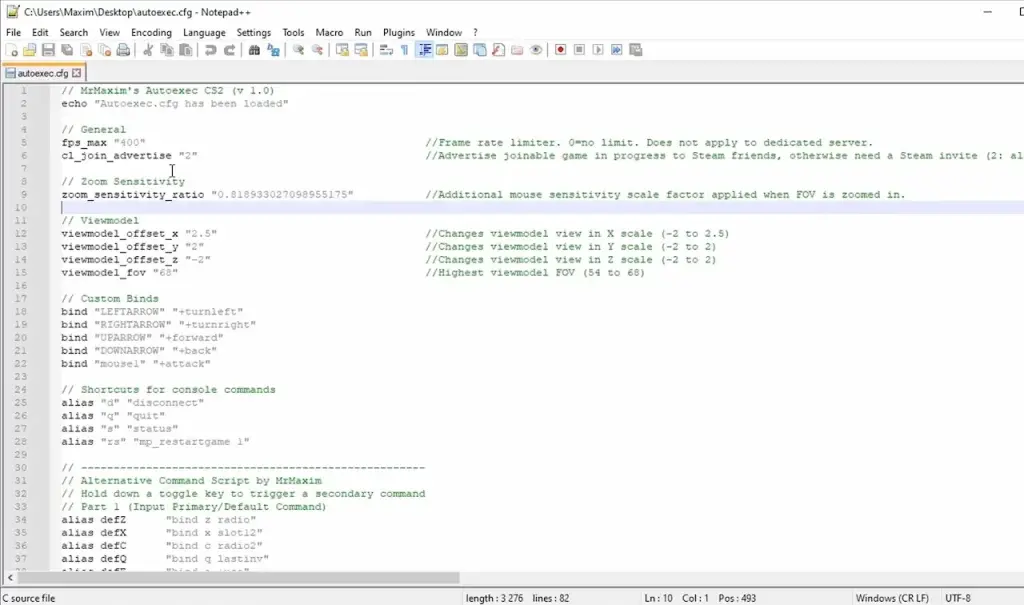
Example of a CS2 autoexec open in a text editor. External reference image from BO3.gg; used here as a visual example for the demo layout.
How to prove your autoexec actually loaded
Forum guides often throw ten fixes at the player at once. A better page gives them one binary test.
1. Add a unique echoUse a line such as echo "AUTOEXEC LOADED" so there is no ambiguity.
→
2. Run it manuallyOpen the developer console and type exec autoexec.
→
3. Read the consoleIf your message appears, the cfg is valid. Now test whether it also loads automatically at startup.
Most likely failure points
Illustrative troubleshooting priority based on recurring community reports—not measured failure-rate data.
Hidden .txt extension
check first
Wrong cfg folder
very common
Startup load issue
easy to isolate
Bad/outdated command
patch dependent
Where this page sits in the CS2 traffic cluster
Page #1 catches people looking for a better setup. Page #2 catches them when that setup breaks. That creates a natural internal-link loop instead of five random articles.
cs2 best launch options reddit Page #1 · optimization comparison
8K–12K
cs2 autoexec setup / not working Page #2 · troubleshooting + setup
The monthly-search numbers above are still the estimates from your original keyword list. I would validate the complete cluster with Keyword Planner / Ahrefs / Semrush before treating these figures as real traffic forecasts.
Source layer
The page is strongest when it openly separates stable setup facts from community-reported patch problems.
Reddit — “Couldn’t exec Autoexec in CS2”Long-running troubleshooting thread. Replies in 2026 still confirm the hidden extension / real cfg-file fix helped. Open source ↗
Steam Community — CS2 config.cfg 2026+Explains the local game\csgo\cfg location and the separate Steam userdata config layer. Open source ↗
Steam Community — Autoexec guideUpdated guide covering where to create the file and why the .cfg extension matters. Open source ↗
Reddit — April 2026 update reportRecent player report that a newly problematic command could stop an existing autoexec from loading, useful as a patch-specific troubleshooting note. Open source ↗
FAQ block for search traffic
Where does autoexec.cfg go in CS2?
Use the local CS2 cfg directory inside Counter-Strike Global Offensive\game\csgo\cfg\. Your exact Steam library drive can differ.
Why does CS2 say “couldn’t exec autoexec”?
The first things to check are the folder and the real file extension. On Windows, a file that visually appears to be autoexec.cfg may actually be autoexec.cfg.txt if extensions are hidden.
Do I need +exec autoexec.cfg in launch options?
Community guides disagree on whether it is necessary in every setup. The clean troubleshooting method is to make sure exec autoexec works manually first. If it does but the file does not run when the game starts, adding +exec autoexec.cfg is a reasonable startup fallback to test.
Why did my autoexec stop working after a CS2 update?
An update can change or remove command behavior. Test a minimal autoexec containing only an echo line. If that works, restore your old commands gradually to isolate the one causing the problem.